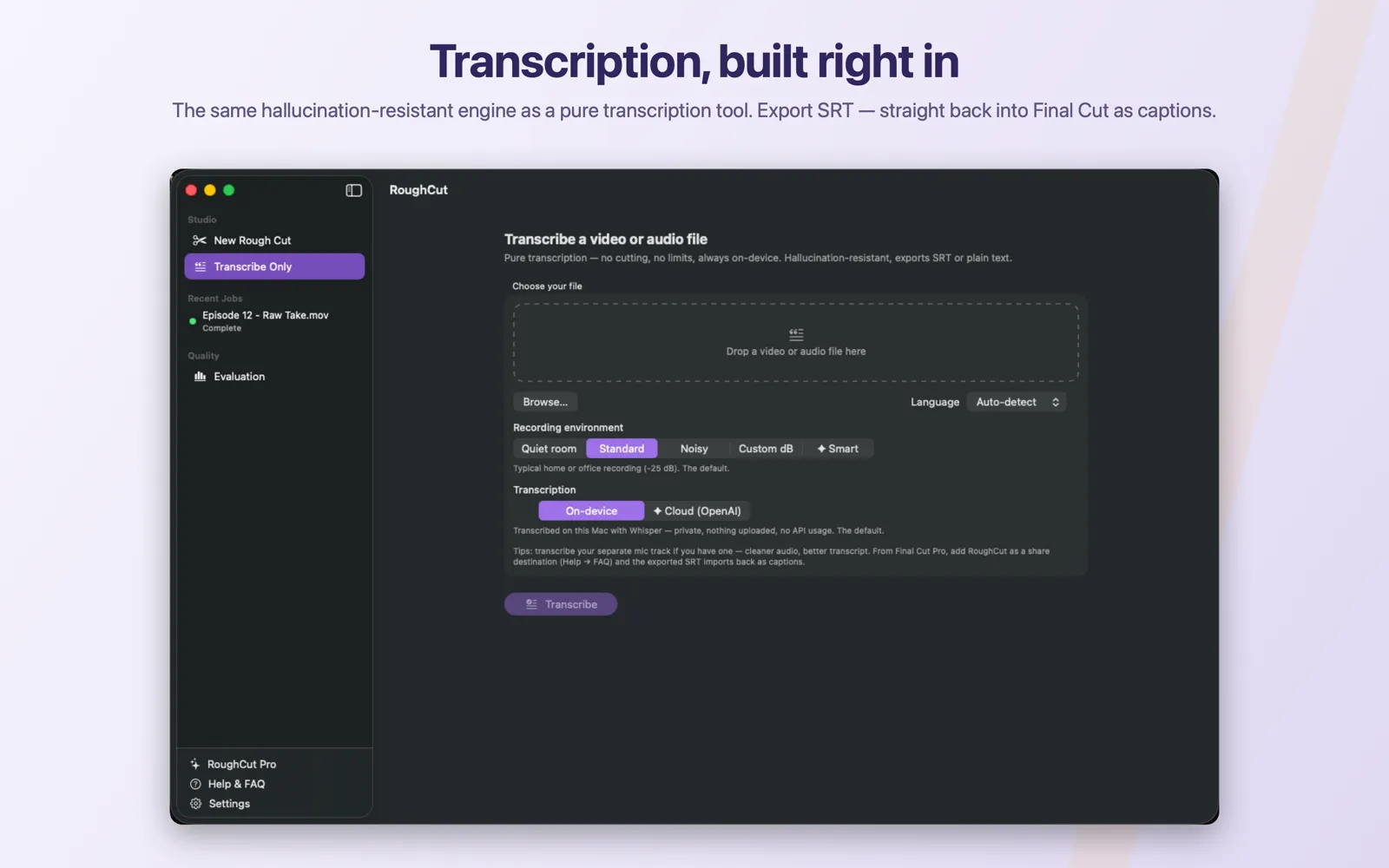
Use Transcribe Only
Transcribe a video or audio file with no cutting, no timeline, and no charge against your five included rough cuts.
Choose Transcribe Only in the sidebar under Studio, add a video or audio file by dropping it, browsing for it, or sending it from Final Cut Pro, then set Language, Recording environment, and Transcription before clicking Transcribe. RoughCut skips the AI editor, the cut plan, the timeline, and the FCPXML entirely, so you get a transcript and nothing else. On-device is the default and keeps the audio on your Mac; Cloud (OpenAI) is a per-job Pro choice that sends that job's audio to OpenAI under your own key, and it is offered on this screen too. Transcribe Only is completely free: it is never gated by purchase and never consumes one of the five included rough cuts. The result gives you a word count, a duration, the detected language, the transcript, any flagged ranges, and SRT or plain-text export.
On this page
Prerequisites
- The speech model installed, unless you have RoughCut Pro and choose Cloud transcription for this job. See Install the local speech model.
- A supported video or audio file. See Choose video and audio inputs.
- No AI provider key. Transcribe Only never runs the AI editor, so no Gemini or OpenAI key is needed on the on-device path.
- No purchase. This tool is not gated by the trial. See How the trial and purchases work.
Steps
- Choose
Transcribe Onlyin the sidebar, underStudio. The screen is headedTranscribe a video or audio file. - Add your file. Drop it on the zone that reads
Drop a video or audio file here, clickBrowse…, or send it from Final Cut Pro and pickTranscribein the chooser sheet. See Add RoughCut as a Final Cut Pro share destination. - Set
Language.Auto-detectis the default and is right for most clips; chooseEnglishorArabicwhen detection guesses wrong. - Leave
Recording environmentonStandard. Silence detection still runs on this path, so the threshold genuinely affects how the audio is segmented for transcription. - Leave
TranscriptiononOn-deviceunless you have a reason to use the Pro Cloud path. On-device transcribes with Whisper on this Mac and uploads nothing. - Click
Transcribe. - When the job finishes, read the result and export
Export SRT…orExport Text….
Expected result
The job runs through audio extraction, silence detection, and transcription, then completes. You get a Your transcript is ready banner with a word count, a duration, the detected language, the full transcript, any flagged time ranges, and two export buttons. See Read and verify a transcript result.
What Transcribe Only skips
This is not a rough cut with the cutting turned off. RoughCut leaves out whole stages:
| Stage | Rough cut | Transcribe Only |
|---|---|---|
| Audio extraction | Yes | Yes |
| Silence detection | Yes | Yes |
| Transcription | Yes | Yes |
| AI editor pass | Yes, when Bad-take removal is on | Never |
| Cut plan and review list | Yes | Never |
| FCPXML timeline | Yes | Never |
Because there is no cut plan, a finished Transcribe Only job has no review list, no Recompute Cuts, and no Export for Final Cut Pro…. Its toolbar offers Reveal in Finder and the two transcript exports. Transcribe Only also skips the media probe, so it never raises the variable-frame-rate warning that a cutting job can.
It is free, and it never spends a rough cut
Transcribe Only is the one part of RoughCut that is not metered at all:
- It is never gated by purchase. It runs whether or not you have bought the unlock and whether or not your free cuts are exhausted.
- It never consumes one of the five included rough cuts. Only a completed cutting job does that.
- There is no cap on how many files you transcribe.
The Pro options that appear on this screen are still Pro. Smart under Recording environment and ✦ Cloud (OpenAI) under Transcription open the Pro paywall for non-subscribers, and the selection stays where it was. Everything else on the screen is free.
Where your audio goes
The screen's own subtitle claims transcription here is on-device without exception. That subtitle is wrong, and it is the one line on this screen you should not trust. The same screen renders theTranscriptionpicker, and its✦ Cloud (OpenAI)option works on Transcribe Only jobs exactly as it does on cutting jobs.
The accurate statement is per-path:
On-device— the default, and the private path. RoughCut transcribes with Whisper on your Mac. Nothing is uploaded and no API is called.✦ Cloud (OpenAI)— a Pro, per-job choice. When you select it, that job's audio is sent to OpenAI's transcription model under your own OpenAI key, and OpenAI bills you at their per-minute rate. Only audio is sent; no video is ever uploaded.
The choice is made per job and is visible on the screen before you press Transcribe. See Choose on-device or cloud transcription and What data leaves your Mac.
Transcribe the cleanest audio you have
RoughCut says it on the screen itself: if you recorded a separate microphone track, transcribe that instead of the camera file. A lavalier or shotgun track that is closer to the speaker and further from room noise produces a materially better transcript than the same words picked up by a camera mic across the room.
Audio files are first-class input here. wav, mp3, and m4a are all accepted, and an audio-only file sent from Finder or Final Cut Pro goes straight to this screen — the chooser sheet does not offer to make a rough cut from audio, because there is no video to cut.
Common mistakes
- Waiting for the model when you did not need to. Transcribe Only needs the speech model on the on-device path, exactly like a rough cut. If
Transcribeis disabled with the hintDownload the Whisper model in Settings first., install the model first. - Assuming Cloud is unavailable here. It is available, it is Pro, and it does send that job's audio to OpenAI. Check the
Transcriptionpicker before you start a sensitive job. - Transcribing the camera file when a mic track exists. The mic track will almost always transcribe better.
- Expecting a timeline. There is no FCPXML on this path. If you want cuts, use Create your first rough cut instead.
- Expecting an editable transcript. RoughCut exports the transcript; it does not offer a full transcript editor in the current version.
Troubleshooting
| Symptom | Likely cause | What to do |
|---|---|---|
Transcribe is disabled | No file chosen, or the model is not ready and Cloud is off | Add a file; install the model, or switch to Cloud if you have Pro and an OpenAI key. |
| The file is refused on drop | Unsupported extension | RoughCut accepts video mp4, mov, mkv, avi, m4v and audio wav, mp3, m4a. See Supported inputs and generated files. |
Selecting ✦ Cloud (OpenAI) snaps back to On-device | Not subscribed to Pro | The paywall opens and the selection is left alone deliberately. Stay on-device, or subscribe. |
| Cloud transcription fails immediately | No OpenAI key saved | The job reports Cloud transcription needs your OpenAI API key. Add it in Settings, or switch the job to on-device. See Add your OpenAI API key. |
| Large parts of the transcript are flagged | Difficult audio | This is the intended behaviour, not a failure. See Read and verify a transcript result. |
If the job fails outright, read the message on the job before deleting anything, then see Troubleshooting by symptom.