Evaluate RoughCut against your own edits
The optional advanced system that scores RoughCut's automatic cuts against reference edits you made yourself.
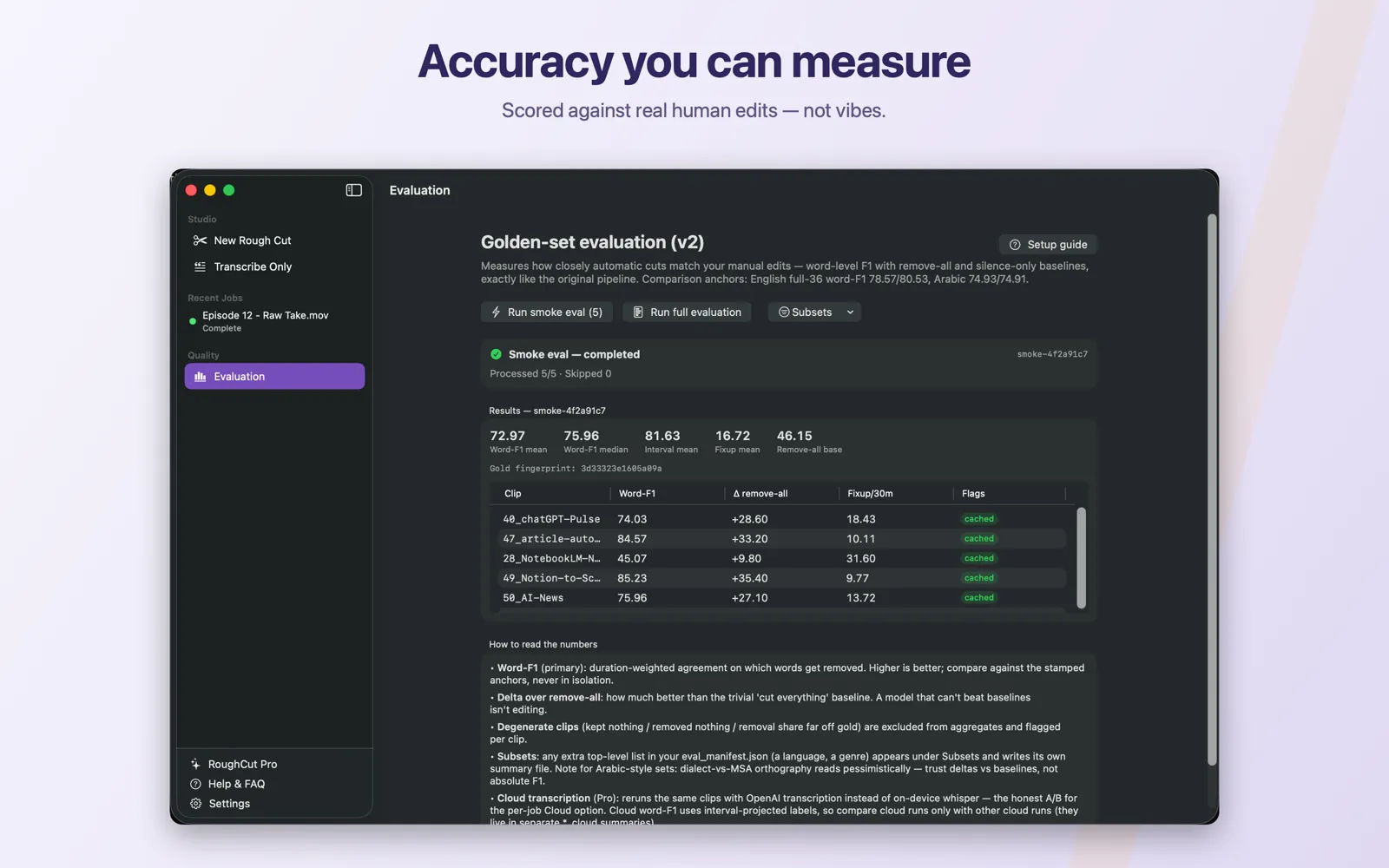
Evaluation is an optional advanced tool for editors who already have reference edits of their own. A golden set is a folder of source clips plus one reference edit per clip; you connect that folder once in Settings → Models & Data, then open Evaluation in the sidebar. A smoke run scores 5 clips for fast iteration, a full run uses the configured cap — 15 clips by default, where 0 means every clip — and any extra list you define in the manifest appears as its own subset. Uncached clips call the AI provider you selected and are billed to your own key; clips whose transcript and AI responses are already cached replay with no API calls at all. Only evaluations read the golden-set folder — ordinary rough-cut jobs never touch it. Start with a smoke run, fix whatever it skips, then run full.
On this page
This is advanced, optional territory. Nobody needs evaluation to make a rough cut, and nothing on this page changes how ordinary jobs behave. It exists for one situation: you already edited some clips by hand, you still have those edits, and you want a repeatable measurement of how close RoughCut's automatic decisions come to yours. The safe default is to leave it alone. If you never open Evaluation, nothing about the app is different.
Prerequisites
- Clips you have already edited manually, with the kept ranges recoverable from your editor timeline. Without those, there is nothing to measure against.
- A folder you can point RoughCut at, on a local disk. See Build a golden set.
- An AI provider key, because evaluation runs the real editing pass. See Choose Gemini or OpenAI.
- Willingness to be billed by that provider for clips that are not yet cached.
What a golden set is
A golden set is two things per clip, in one folder per clip:
- The source media — the clip's audio or video.
- The reference edit — a
gold_v2.jsonfile listing the time ranges you kept when you edited that clip by hand.
A top-level eval_manifest.json says which clips belong to which run. RoughCut cuts each listed clip with the real pipeline, compares its decisions to yours, and reports agreement scores against honest baselines.
The reference edit is the measuring stick. If it is careless, every number the system produces is careless in the same direction — see Create gold_v2.json reference edits.
Connect the folder once
Open Settings → Models & Data, find the Golden set (evaluation data) section, and click Choose golden-set folder…. Pick the folder that directly contains eval_manifest.json. The status label flips from Not connected to Access granted, and RoughCut records the path for you.
Grant access this way rather than typing a path into Eval dataset root by hand. Choosing the folder in the panel is what gives the sandboxed app permission to read it; a path typed into the field without that grant does not.
Then choose Evaluation in the sidebar. Until the folder is connected, the dashboard shows Connect the golden-set folder to run evaluations. with a Connect in Settings… button, and the run buttons stay disabled.
The kinds of run
| Run | Button | How many clips | When to use it |
|---|---|---|---|
| Smoke | Run smoke eval (5) | 5 clips, for quick iteration | Every time you change a setting. Fast, cheap, and enough to catch obvious breakage |
| Full | Run full evaluation | The configured cap — Full eval max clips, default 15; set it to 0 to run every clip in the list | When a smoke result looks worth confirming across the whole set |
| Subset | Subsets → Run <name> subset | Whatever that list contains | Language-specific or genre-specific sets, for example an arabic list |
The Subsets menu appears only when your own eval_manifest.json defines an extra top-level list beyond smoke and full. Most golden sets define none and see no menu. See Create eval_manifest.json.
One run at a time. Starting a second while one is in flight gives you An evaluation is already running. A run in progress can be stopped with Cancel.
What a run costs
This is the part to read before clicking anything.
- Uncached clips call the AI provider you selected, live, on your own key. The confirmation dialog says so:
Uncached clips call the LLM API live and can take a while. Cached clips replay with no API calls. - Cached clips are free and near-instant. On the first evaluation of a clip, RoughCut writes the transcript and the AI responses beside that clip. Later runs replay those artifacts, so re-running a set you have already scored costs nothing at the provider.
- Changing a setting that changes the request changes the cache key, so expect a fresh round of billed calls after a meaningful configuration change.
- Rows that replayed from cache are tagged
cachedin the results table.
RoughCut never bills you for evaluation. Your provider bills you directly for whatever calls a run makes, at their published rates.
Cloud transcription A/B is a separate, Pro-only arm
If you have RoughCut Pro, the dashboard shows a Cloud transcription (whisper-1) toggle. It re-runs the same clips with OpenAI transcription instead of the on-device model — the honest A/B for the per-job Cloud option described in Transcription options.
Two things matter about it:
- It sends the audio of uncached clips to OpenAI under your own key, billed per audio minute, in addition to the AI editing calls. On-device runs send no audio anywhere.
- It writes separate caches and separate summaries. Cloud results never overwrite your on-device numbers, and cloud runs are only comparable to other cloud runs. The dashboard repeats this:
Transcription: <source> — compare only against other cloud runs.
Without Pro the toggle is not shown and every evaluation runs on-device.
Only evaluations read the golden-set folder
Ordinary rough-cut jobs never open it. Settings puts it plainly: only evaluations touch this folder, daily jobs never do. Connecting a golden set does not change what a normal job sends, cuts, or costs.
The reverse is also true — evaluation writes only inside the golden-set folder (summaries beside the set, a per-clip report inside each clip folder, and the cache artifacts). It does not modify your source media.
A sensible first session
- Connect the folder and run
Run smoke eval (5). - Read the skip list. Skips are always recorded with a reason —
clip_dir_missing,missing_media,missing_gold— so you can repair the folder one clip at a time. - Read the failures list, which names the clip and the error.
- Fix the folder, re-run smoke. Cached clips replay free, so iteration is cheap.
- Once smoke is clean, run
Run full evaluationand treat that as your reference point. - Learn to read the numbers before you act on them: Read evaluation metrics correctly.
Getting back to the default
There is nothing to undo in your ordinary workflow — evaluation never altered it. If you changed Full eval max clips while experimenting, set it back to 15 and click Save Configuration; RoughCut only stores values that differ from the default, so a restored default is simply dropped from your configuration file. See Advanced settings reference.
Common mistakes
- Running full before smoke. Full is the expensive run. Smoke exists precisely so you find a broken manifest for the price of five clips.
- Treating a single average as a verdict. A mean word-F1 is meaningless without the baselines beside it. See Read evaluation metrics correctly.
- Comparing a cloud run to an on-device run. They are scored through different label projection and stored in different summaries. Compare like with like.
- Building the reference edits from RoughCut's own output. That measures the app against itself and will always look excellent.
- Keeping the golden set in a cloud-synced folder. macOS permission prompts and sync delays turn a two-minute run into a debugging session.
Troubleshooting
| Symptom | Cause | Fix |
|---|---|---|
| Run buttons disabled | No golden set connected, or a run is already going | Connect the folder in Settings → Models & Data, or wait for the current run |
Golden-set folder not connected. Grant access in Settings → Models & Data first. | The security-scoped grant is missing | Re-pick the folder with Choose golden-set folder… |
Golden-set access lost — pick the folder again in Settings. | The folder moved, was renamed, or the grant expired | Pick it again in Settings → Models & Data |
| Manifest not found | No eval_manifest.json at the root of the connected folder | Add one — see Create eval_manifest.json |
| macOS denied access to the golden set | The set sits in a cloud-synced folder that macOS is protecting | Move the set to a local disk, or grant RoughCut the access macOS asks for |
| Every clip skipped | The manifest names folders that do not exist, or the clip folders lack media or gold | Read the skip reasons and fix the folder layout |
For anything else, see Troubleshooting by symptom and the Error reference.