Choose the recording environment and silence threshold
What each of the five recording environments does, the exact dB each one uses, and how to read a cut that removed too much or too little.
The recording environment control sets one number: the level below which audio counts as silence. Quiet room is −35 dB, Standard is −25 dB and is the default, Noisy is −20 dB, Custom dB accepts any value from −60 to −10 dB, and Smart is a Pro option that measures this recording's own noise floor and picks the threshold for you, falling back to the standard −25 dB when the recording has no stable pause plateau to measure. A lower number is stricter and keeps more of your footage; a higher number is looser and cuts more. Min silence is a separate control deciding how long a quiet run must last before it is cut at all, and it defaults to 0.5 seconds. When a cut feels wrong, change one of the two and process the job again.
On this page
What this control actually sets
Recording environment is a friendly front end for a single number: the silence threshold, in decibels. Anything quieter than that number is treated as silence and becomes a candidate for removal. Anything louder is treated as sound worth keeping.
Silence removal always runs, on every rough cut, whether or not the AI editor pass is enabled. This control is therefore the one setting that affects every job you will ever make.
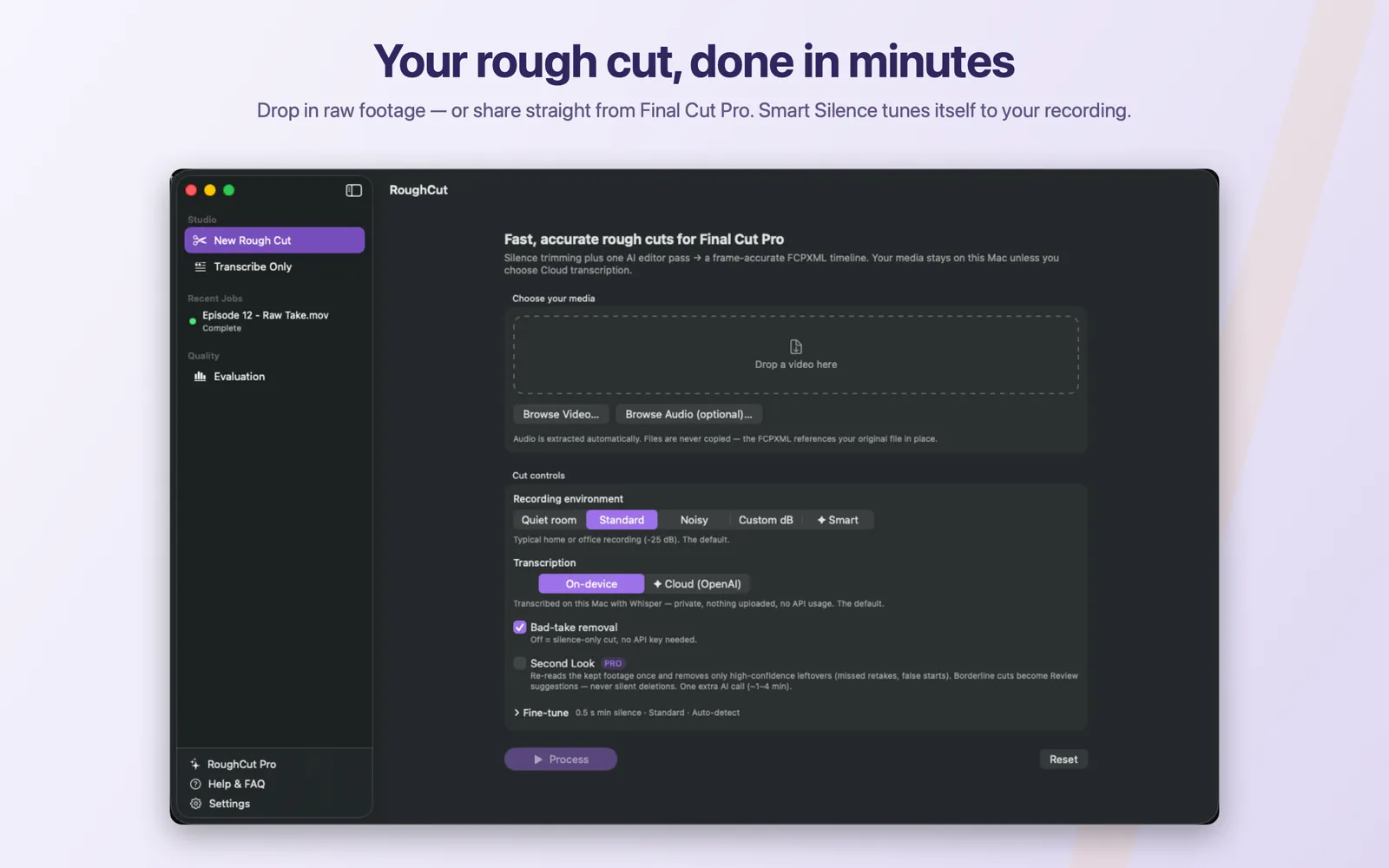
Recording environment sits at the top of Cut controls, above Transcription and Bad-take removal.The five options
| Option | Threshold | Caption shown in the app | Pro |
|---|---|---|---|
Quiet room | −35 dB | Treated room or good mic close-up (-35 dB): strict — even soft pauses count as silence. | No |
Standard | −25 dB (default) | Typical home or office recording (-25 dB). The default. | No |
Noisy | −20 dB | Car, street, fan, or busy background (-20 dB): background rumble still counts as silence. | No |
Custom dB | You type it | Set the exact silence threshold yourself. | No |
✦ Smart | Measured per recording | Smart Silence (Pro): RoughCut measures this recording's noise floor and picks the threshold for you. The chosen value is shown on the job. | Yes |
Standard is the default and is the right starting point for almost every recording made indoors with a reasonable microphone. Change it only when the result tells you to.
Which preset to reach for
Quiet room— a treated room, a close-miked voiceover, a good lavalier. The noise floor is genuinely low, so a strict threshold is safe and pauses get trimmed tightly.Standard— a normal room with a normal microphone. Some room tone, some computer fan, nothing dominant.Noisy— a car, a street, an air conditioner, an open-plan office. The background is loud enough that a strict threshold would classify the rumble as speech and leave every pause in place.
Custom dB
Selecting Custom dB reveals a numeric field with this helper text:
dB — sounds quieter than this count as silence (-60 strict … -10 loose)The valid range is −60 dB to −10 dB. Outside it, the job refuses to run and shows:
Silence threshold must be between -60 and -10 dB.The direction of the scale is the part people get backwards, so it is worth stating plainly:
| Move the number | Effect | Result in the cut |
|---|---|---|
| Lower (towards −60) | Stricter | Less audio qualifies as silence, so more footage is kept |
| Higher (towards −10) | Looser | More audio qualifies as silence, so more footage is cut |
Try the presets before you type a number. They cover the great majority of recordings, and a hand-picked threshold that is wrong is harder to diagnose than a preset that is wrong.
Smart Silence
Smart is a RoughCut Pro feature. Instead of applying a fixed number, it analyses the recording you actually loaded, estimates its noise floor, and derives a threshold from it.
- The measurement sweeps candidate thresholds across the full −60 dB to −10 dB range and looks for a stable plateau — the region where pauses behave like pauses. The chosen threshold sits just above the point where the noise floor stops and speech begins.
- When the analysis finishes, the value it settled on is written onto the job and shown in the job header:
``text Smart Silence picked <n> dB ``
A measured noise-floor figure is shown alongside it when one is available.
- When no stable pause plateau exists, Smart falls back to the standard −25 dB. This happens with wall-to-wall talking, where there are no real pauses to measure, and with constant noise sitting at roughly speech level. The banner still reports the value that was used, so a job reading
Smart Silence picked -25.0 dBon a relentlessly talkative recording is the expected fallback, not a bug.
Choosing Smart without a Pro subscription opens the Pro paywall and leaves the selection on whichever option was already active. Nothing changes silently.
The banner is genuinely useful even if you do not keep the subscription running: it tells you the number that suited a given recording setup, and you can type that number into Custom dB on future jobs shot in the same room.
Min silence is a separate decision
Min silence (sec), inside the collapsed Fine-tune section, answers a different question. The threshold decides how quiet counts as silence; Min silence (sec) decides how long a quiet run must last before it is a cut at all.
| Property | Value |
|---|---|
| Label | Min silence (sec) |
| Default | 0.5 seconds |
| Valid range | 0.1 to 5.0 seconds |
| App help text | Pauses shorter than this survive. Raise to keep breathing room; lower to tighten pacing. |
| Validation error | Min silence must be between 0.1 and 5 seconds. |
Raise it towards 1.0 s for a conversational, unhurried delivery where breaths and beats are part of the performance. Lower it towards 0.3 s for a tightly paced tutorial where every pause is dead air. Below about 0.2 s you begin clipping the natural gaps between words, which sounds unnatural even though nothing was technically mis-detected.
The two controls interact. If pauses are surviving, either they are not quiet enough to pass the threshold, or they are not long enough to pass the minimum. Change one at a time.
Symptoms and what to change
| Symptom | Most likely cause | Change |
|---|---|---|
| Too many pauses remain in the cut | The threshold is too strict for this recording's noise floor — the "silence" is louder than the threshold | Move up one preset (Quiet room → Standard → Noisy), or raise the custom value towards −10 |
| Speech is being clipped, words lose their beginnings or ends | The threshold is too loose — quiet speech is being classified as silence | Move down one preset (Noisy → Standard → Quiet room), or lower the custom value towards −60 |
| Road, fan, or crowd noise is being treated as speech, so nothing gets cut | The background sits above the threshold | Use Noisy (−20 dB), or Custom dB a few dB higher still; consider Smart if you have Pro |
| The pacing feels too tight, breaths and beats are gone | The threshold is fine but Min silence (sec) is too low | Raise Min silence (sec) towards 0.8–1.0 s |
| Short gaps between words are being cut | Min silence (sec) is very low | Return it to the 0.5 s default |
| Cuts look right in some sections and wrong in others | The recording's noise floor changes partway through | Try Smart, or split the recording and process the sections separately |
Each of these is fixed by processing the job again with the changed setting. Changing the threshold is not something the review screen can undo for you: Recompute Cuts re-applies your own keep and remove decisions to the existing analysis, it does not re-detect silence at a new threshold.
Common mistakes
- Reaching for
Custom dBfirst. The presets are three well-chosen points on the same scale. Move between them before typing a number. - Getting the direction backwards. Lower is stricter and keeps more. Higher is looser and cuts more.
- Changing the threshold and the minimum together. When both move, a bad result tells you nothing about which one caused it.
- Expecting
Smartto fix a noisy recording. It picks a better threshold for the noise that is there; it does not remove the noise. - Reading a Smart fallback as a failure. A job that reports −25 dB is telling you the recording had no measurable pause plateau.
Troubleshooting
If a threshold change makes no visible difference, check that the pauses you are looking at are longer than Min silence (sec) — short pauses are exempt regardless of how loud they are.
If the transcript itself is poor, no threshold will save the cut. Fix the input first: see Choose video and audio inputs for using a separate clean microphone track, and On-device and Cloud transcription for the transcription side.