Review the cut on the timeline
How the chronological review list reads — reasons, confidence, audition, and flipping any decision before you export.
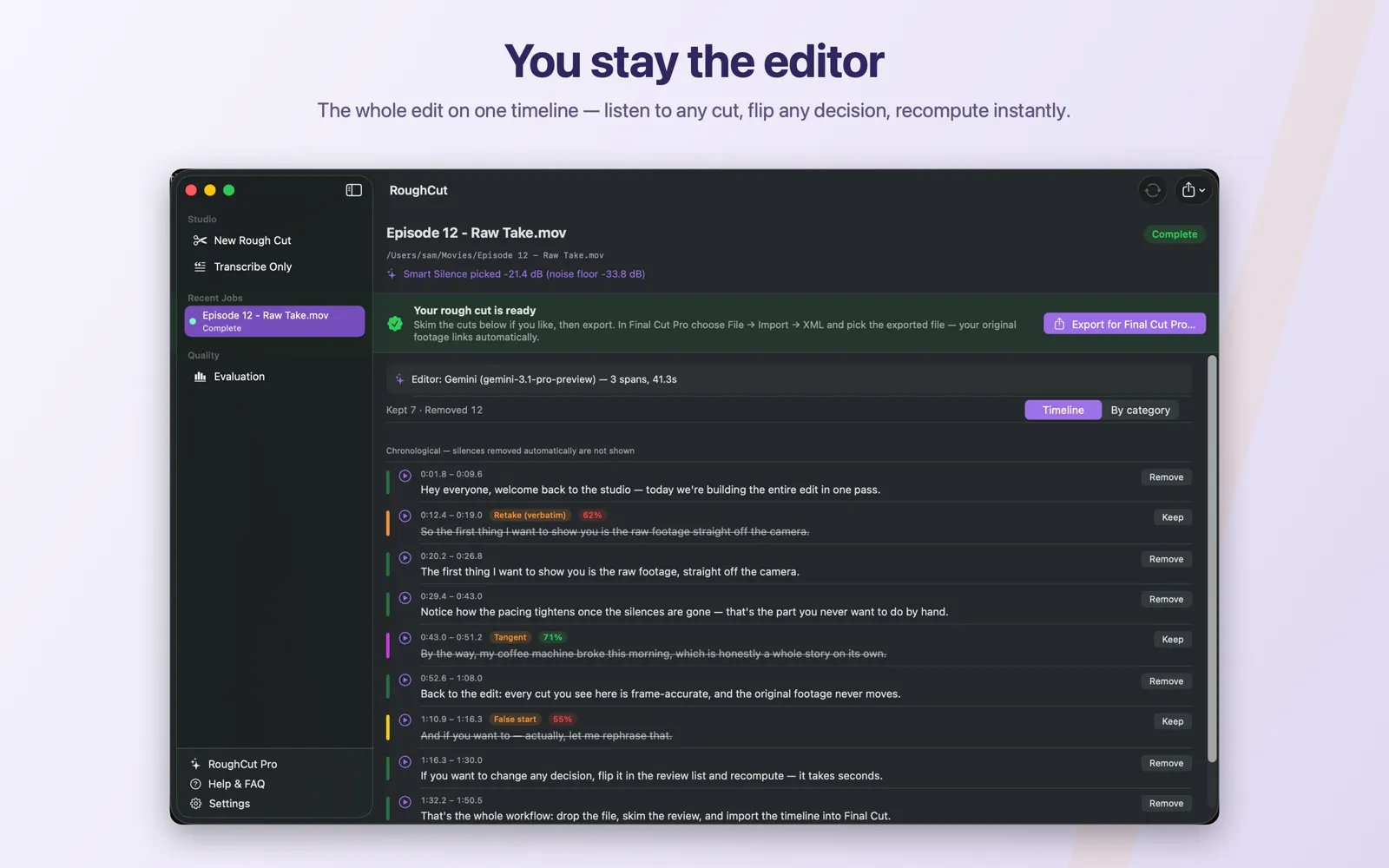
When a rough cut finishes, RoughCut shows every decision it made as a review list. Timeline is the default mode: it sorts items chronologically and hides routine silence and micro-island rows, so what you read is the editorial calls — retakes, false starts, tangents, filler, and noise. Each row carries a time range, the transcript for that span truncated at 220 characters, the reason it was flagged, a confidence pill when the editor supplied one, and a play button that auditions exactly that range of the source audio. Removed rows are struck through and kept rows read normally. Sections the transcriber could not hear cleanly are kept, never silently deleted, and are flagged so you can listen. Keep reverses a proposed removal, Remove excludes a kept segment, and the counter reads Kept and Removed. Nothing takes effect until you click Recompute Cuts.
On this page
- What you see when a job finishes
- `Timeline` mode, and what it hides
- What each row tells you
- The reasons you will see
- Confidence, and what the colour means
- Sections that were kept because the transcript was unclear
- Audition any range
- Flip any decision
- The editor summary banner
- Your changes are pending until you recompute
- Common mistakes
- Next steps
What you see when a job finishes
The job screen shows a Your rough cut is ready banner with an Export for Final Cut Pro… button, and beneath it the review list — one row for every decision RoughCut made about your footage.
Reviewing is optional. Exporting straight from the banner is a reasonable workflow for a clean recording. The list exists so you can check the editor's judgement before the cut reaches Final Cut Pro, and reverse anything you disagree with.
Nothing in this list touches your source file. Every row is a decision about the exported timeline only.
Timeline mode, and what it hides
A segmented picker above the list offers Timeline and By category. Timeline is the default. It sorts every item chronologically by start time, so reading top to bottom follows your recording.
It deliberately hides two kinds of row:
- items whose category is
silence— the pauses that silence detection removed on its own - micro-islands, very short surviving fragments that were merged into an adjacent cut
The section header states this plainly: Chronological — silences removed automatically are not shown.
That is a display filter, not a decision. Those rows still exist and are still reversible — they are listed in By category, under Removed: Silence and Removed: Other.
What each row tells you
| Element | What it means |
|---|---|
| Time range | Where the span sits in your source, formatted m:ss.s — for example 3:07.4 |
| Transcript | The words inside that span. Long spans are truncated at 220 characters |
| Reason | Why the span was flagged, in plain language — see the table below |
| Confidence | An integer percentage pill, when the editor supplied a score |
| Play / pause | Auditions exactly that range of the source audio |
Removed rows render struck through in a secondary colour. Kept rows render normally. A coloured bar on the left of each row keys the row to its category.
The reasons you will see
| Reason shown on the row | What it means |
|---|---|
Silence | A pause below your silence threshold, longer than Min silence (sec) |
Retake (verbatim) | You said the same line again, near-identically |
Retake (reworded) | You said the same idea again in different words |
False start | A sentence abandoned part-way |
Tangent | A digression away from the video's subject |
Filler | Filler speech with no content |
Noise | Non-speech noise |
Transcription noise over quiet section | Words the model produced over a span that was actually quiet |
Micro island merged into cut | A fragment too short to survive on its own |
Unclear transcription — listen before trusting | Kept. The transcript here is not reliable |
Transcription may have degraded here — listen | Kept. A weaker signal that the transcript slipped |
If you ran Second Look, rows it removed are prefixed Second Look — , and its borderline calls appear as kept rows reading Second Look suggests removing (…) — kept until you decide.
Confidence, and what the colour means
Confidence renders as an integer percentage pill on the row.
- Below 70% the pill is red, with the tooltip
Low confidence — worth a look. Treat these as the rows most worth your attention. - At 70% or above the pill is green, with the tooltip
Editor confidence.
Some rows have no pill at all. Kept segments generated between removals carry no confidence score, because no model judged them — they are simply what is left.
A confidence figure is the editor's own estimate of how sure it is, not a measurement of correctness. A confident wrong call is possible. That is exactly what the audition button is for.
Sections that were kept because the transcript was unclear
When the transcriber could not hear a span cleanly, RoughCut keeps it and flags it. It is never silently deleted, and the row's reason pill is tinted pink rather than orange.
A banner above the list counts them: <n> sections couldn't be transcribed cleanly. They are kept in your cut — use ⏵ to listen and decide.
The two reason strings are Unclear transcription — listen before trusting and Transcription may have degraded here — listen. Both mean the same thing for your purposes: the words on screen may not match what you actually said, so judge that span by ear, not by reading it. If it is genuinely unusable, click Remove on that row.
Audition any range
Each row has a play/pause circle. It plays exactly the row's [start, end] range from your source media — audio only, with no video. The tooltips read Play this section's audio and Stop, and only one row plays at a time.
This is the fastest way to resolve a disagreement with the editor. A row whose transcript reads like a clean take may still be the one where your voice cracked.
Flip any decision
The button on each row is labelled with what it will do, not with the current state:
Keepappears on a removed row. Clicking it reverses the proposed removal.Removeappears on a kept row. Clicking it excludes that segment — and it is also how you accept a Second Look suggestion.
Above the list, a counter reads Kept <n> · Removed <n> and updates live as you flip rows.
If you flip a row back to the decision the pipeline originally made, RoughCut discards the override rather than recording a no-op change. Undo every change and the job is exactly as it was.
The editor summary banner
A line near the top of the review tells you which editor produced these cuts:
LLM editor: skipped — silence-only cut.— no AI pass ran, becauseBad-take removalwas off or no key was available. Every row you see came from silence detection.Editor: <Provider> (<model>) — <n> spans— the AI pass ran on that provider and model and proposed that many spans. The line may also carry the call's latency, and(cache hit)when the response was replayed from cache rather than re-requested.
If Second Look was on but could not complete, a separate orange banner says so and confirms that what you are looking at is the standard single-pass result.
Your changes are pending until you recompute
Flipping rows does not change the exported timeline on its own. The cut plan and the FCPXML are rewritten only when you click Recompute Cuts, which is enabled as soon as at least one decision differs from the pipeline's own.
Export before recomputing and you export the original cut. See Recompute after review changes.
Common mistakes
- Reading the transcript instead of listening. The transcript is a summary of a span, truncated at 220 characters, and on flagged rows it may be wrong. Audition anything you are unsure about.
- Assuming a hidden silence row is unreviewable. Switch to By category to see and reverse every silence and micro-island removal.
- Exporting after flipping rows without recomputing. The export reflects the last computed cut plan, not your pending toggles.
- Deleting flagged sections on sight. They are flagged because the transcript is unreliable, not because the footage is bad.
- Trusting a high percentage as proof. It is the editor's own confidence, not an accuracy guarantee.
Next steps